
Notice of recount in Klickitat County; Advocacy Lunch Sept. 11
Author: Robert Timlick
-

macOS Version of HZ RAT Backdoor Targets Chinese Messaging App Users
Users of Chinese instant messaging apps like DingTalk and WeChat are the target of an Apple macOS version of a backdoor named HZ RAT.
The artifacts “almost exactly replicate the functionality of the Windows version of the backdoor and differ only in the payload, which is received in the form of shell scripts from the attackers’ server,” Kaspersky researcher Sergey Puzan said.
HZ RAT was first -
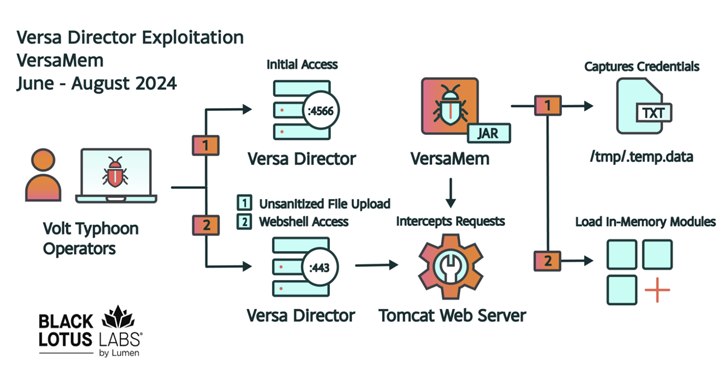
Chinese Volt Typhoon Exploits Versa Director Flaw, Targets U.S. and Global IT Sectors
The China-nexus cyber espionage group tracked as Volt Typhoon has been attributed with moderate confidence to the zero-day exploitation of a recently disclosed high-severity security flaw impacting Versa Director.
The attacks targeted four U.S. victims and one non-U.S. victim in the Internet service provider (ISP), managed service provider (MSP) and information technology (IT) sectors as early -
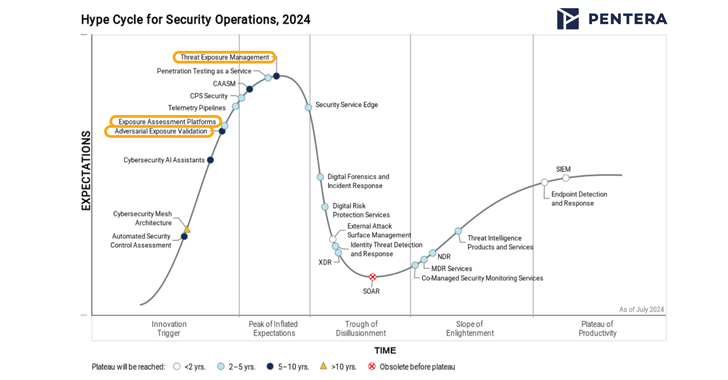
CTEM in the Spotlight: How Gartner’s New Categories Help to Manage Exposures
Want to know what’s the latest and greatest in SecOps for 2024? Gartner’s recently released Hype Cycle for Security Operations report takes important steps to organize and mature the domain of Continuous Threat Exposure Management, aka CTEM. Three categories within this domain are included in this year’s report: Threat Exposure Management, Exposure Assessment Platforms (EAP), and Adversarial -

Microsoft Fixes ASCII Smuggling Flaw That Enabled Data Theft from Microsoft 365 Copilot
Details have emerged about a now-patched vulnerability in Microsoft 365 Copilot that could enable the theft of sensitive user information using a technique called ASCII smuggling.
“ASCII Smuggling is a novel technique that uses special Unicode characters that mirror ASCII but are actually not visible in the user interface,” security researcher Johann Rehberger said.
“This means that an attacker -

Google Warns of CVE-2024-7965 Chrome Security Flaw Under Active Exploitation
Google has revealed that a security flaw that was patched as part of a software update rolled out last week to its Chrome browser has come under active exploitation in the wild.
Tracked as CVE-2024-7965, the vulnerability has been described as an inappropriate implementation bug in the V8 JavaScript and WebAssembly engine.
“Inappropriate implementation in V8 in Google Chrome prior to -
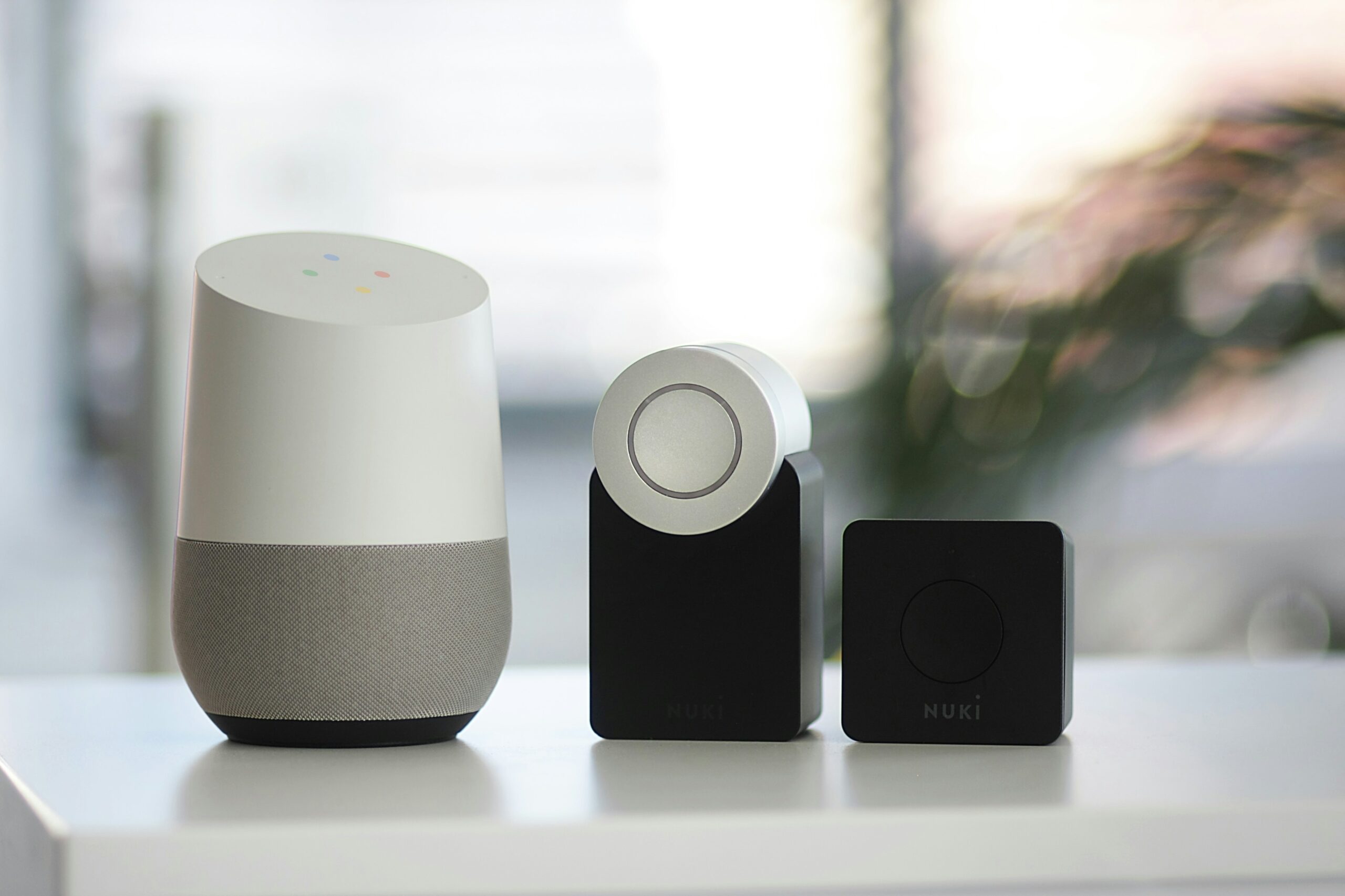
Unified Smart Homes: How Matter is Setting a New Standard
Is your smart home turning into a smart mess? Do your smart office devices speak different languages? You’re not alone. The current smart home and office technology landscape is riddled with incompatibility issues. This forces you to juggle several apps and deal with frustrating setup processes.
Smart home adoption is skyrocketing. Experts expect household penetration to be 18.9% in 2024. By 2028, that number nearly doubles to 33.2%. But these devices are not only becoming home standards. Smart speakers, sensors, and more are increasingly in use by businesses.
But fear not, there’s a light at the end of the tunnel. A new standard called Matter is here to unify the smart tech world. As a homeowner or business owner invested in smart technology, “Matter” matters. Let’s break down what this means for you.
The Smart Home Struggle is Real: A Tower of Babel
Imagine this: you buy a fancy new smart lock. Then you discover it doesn’t work with your existing smart light bulbs. Or you try to create automated routines in your office. But your devices can’t seem to communicate with each other. This is the reality for many smart home and office owners today.
The culprit? A lack of a universal standard. Different brands use different protocols, creating a fragmented mess. There’s Alexa, Google Assistant, Siri, and others – each with its pros and cons. But not exactly working seamlessly together.
This translates to:
- Limited Functionality: Your devices might not work together as planned. This can hinder the potential for true automation.
- Setup Headaches: Connecting and configuring a multi-brand smart system can be complex. You may end up with a time-consuming nightmare.
- App Overload: Juggling several apps for different devices is a recipe for frustration.
Matter to the Rescue: The Unifying Force
Matter is a standardized language for smart devices. It was developed by a group of leading tech companies in the smart home space. This standard helps ensure smart devices can all communicate, regardless of brand.
Here’s how Matter benefits you.
Goodbye, Compatibility Issues
Matter-certified devices will work together flawlessly. This means your smart lights will finally talk to your smart lock. Your office thermostat can play nice with your security system.
Hello, Easy Setup
Setting up new devices becomes a breeze. No more deciphering complex protocols or struggling with different apps.
Peace of Mind with Security
Matter prioritizes strong encryption and device authentication. This keeps your smart home or office safe from potential security threats. This is an important consideration when choosing smart home tech. Not all manufacturers place security first. Just looking for “Matter-certified” on a label makes it easier to choose wisely.
Future-Proof Technology
Matter is designed to adapt and evolve. This ensures compatibility with new devices and technologies as they emerge. You don’t find your tech “aging out” of an entire smart hub system.
What Matter Means for Your Smart Space
As Matter adoption increases, you can expect:
- More Choices: A wider range of Matter-certified devices will hit the market. This allows you to pick the best options for your needs. And not have to worry about brand compatibility.
- Simplified Management: Imagine controlling your smart home or office from a single app. Matter makes this dream a reality.
- Enhanced Security: Robust security features built into Matter provide peace of mind. You can have confidence your connected space is protected.
Embrace the Future of Smart: How to Get Ready for Matter
The Matter revolution is underway, but it’s still early days. Here’s how you can prepare:
- Stay Informed: Keep an eye out for Matter updates and announcements. This can help you learn which devices are becoming Matter-certified.
- Invest Wisely: Consider opting for Matter-certified devices when replacing existing ones. Or when adding new features to your smart space.
- Be Open to Change: Prepare to embrace Matter-based solutions. Especially as Matter becomes more widespread. This helps you build a more unified and convenient smart home or office experience.
Matter is a game-changer for smart technology users. It paves the way for a more intuitive and user-friendly experience. This allows you to focus on the real benefits of smart tech. These include convenience, efficiency, and comfort.
So, ditch the app overload and say goodbye to compatibility woes. Unified is the future of smart homes and offices, and Matter is leading the charge!
Improve Your Smart Home/Office Setup & Security!
Is your smart home or office giving you what you need? Is it letting hackers into your network without your knowledge?
Get some relief! Our smart tech experts can help you with a unified setup. We can also ensure that your devices and network are fully secured.
Contact us today to schedule a chat.
—
This Article has been Republished with Permission from The Technology Press.
-
Digital Defense: Essential Security Practices for Remote Workers
The rise of remote work has redefined the modern workplace. Gone are the days of rigid office schedules and commutes. But with this flexibility comes a new set of challenges – cybersecurity threats. Remote work environments often introduce vulnerabilities to your organization’s data and systems.
73% of executives believe that remote work increases security risk.
But this doesn’t mean you can’t mitigate that risk. Below, we’ll equip you with essential security practices for remote teams. You’ll learn how to keep company data safe and secure, no matter your location.
1. Securing Home Networks
Strong Wi-Fi Encryption
Ensure that your Wi-Fi is encrypted with the latest security protocols, such as WPA3. This is a foundational step in securing a home network. This prevents unauthorized users from accessing your network and intercepting data.
Changing Default Router Settings
Many routers come with default usernames and passwords. These are well-known to cyber criminals. Change these to unique, strong credentials. This helps prevent unauthorized access to your network.
Regular Firmware Updates
Routers, like any other digital device, need updates to patch security vulnerabilities. Make sure to check for and install firmware updates from the manufacturer. This helps to keep your router secure.
2. Use Strong, Unique Passwords
Password Managers
Remote workers use several accounts and services to access their work. This means managing passwords can be a daunting task. Password managers can generate, store, and autofill complex passwords. This helps ensure that each account has a unique and strong password.
Multi-Factor Authentication (MFA)
Installing MFA adds an extra layer of security. Even if a hacker compromises a password, MFA requires a second form of verification. This is usually a text message code or app authentication. This second step makes it much harder for attackers to breach accounts.
3. Protecting Devices
Antivirus/Anti-Malware Software
Ensure that all devices used for work purposes have up-to-date anti-malware software installed. These tools can detect and neutralize threats before they cause significant damage.
Regular Software Updates
Outdated software can have vulnerabilities that are exploited by cybercriminals. To stay protected against the latest threats, enable automatic updates for your:
- Operating system
- Applications
- Security software
Encrypted Storage
Use encrypted storage for sensitive data. This ensures that even if a device is lost or stolen, the data remains inaccessible to hackers. You can use both built-in options and third-party solutions.
4. Secure Communication Channels
Virtual Private Networks (VPNs)
A VPN encrypts your internet traffic. This makes it difficult for attackers to intercept and access your data. Using a reputable VPN service is crucial. Especially when accessing company resources over public or unsecured networks.
Encrypted Messaging and Email
Use encrypted communication tools. These protect the content of your messages and emails. When choosing messaging and email services, ask about encryption. This can ensure that your communications remain private and secure.
5. Safe Browsing Practices
Browser Security
Ensure that your web browser is up-to-date and configured for security. This includes:
- Enabling features such as pop-up blockers
- Disabling third-party cookies
- Using secure (HTTPS) connections whenever possible
Avoiding Phishing Attacks
Phishing attacks are a common threat to remote workers. Be vigilant about unsolicited emails or messages asking for sensitive information. Verify the sender’s identity before clicking on links or downloading attachments. Report suspicious communications to your IT department. This helps others on your team avoid the same emails.
Use of Ad Blockers
Ad blockers can prevent malicious ads from displaying on your browser. These often contain malware or phishing links. This adds an extra layer of security while browsing the web.
6. Educating and Training
Regular Security Training
Continuous education on the latest security practices and threats is essential. This includes phishing simulations and best practices for device and data security. Teams should also be aware of any new security protocols.
Incident Response Plan
Put a clear incident response plan in place. This ensures that all employees know what steps to take in the event of a security breach. This should include:
- Reporting procedures
- Mitigation steps
- Contact information for the IT support team
7. Personal Responsibility and Vigilance
Personal Device Hygiene
Employees should maintain good digital hygiene on their personal devices. This includes regular backups and secure configurations. They should also separate personal and professional activities where possible.
Being Aware of Social Engineering
Social engineering attacks exploit emotions to gain access to systems and data. Being aware of common tactics, such as pretexting and baiting. Maintaining a healthy skepticism can prevent falling victim to these attacks.
Need Help Improving Remote Work Cybersecurity?
The transition to remote work has brought about significant changes. You need to evolve how you approach digital security. As cyber threats continue to grow, so too must security practices.
Do you need some help? Our experts can help ensure that you are well-equipped to handle remote work securely.
Contact us today to schedule a chat about your cybersecurity.
—
This Article has been Republished with Permission from The Technology Press.