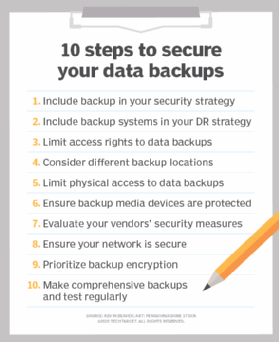
These days, everything is digital. We deal with data every day: from personal photos to work files that hold a lot of value. What happens if you lose that? Well, this is the reason behind doing secure backups of data. Let’s go through some best practices to keep your data safe and secure.
What is Data Backup?
Data backup refers to the creation of a copy of your data. The copy can be used in the event of loss or destruction of the original data. Backups can be stored on various devices, such as external hard drives, or in the cloud. Having a backup ensures you don’t lose important information.
Why is Secure Backup Important?
Backing up will save your data from being lost forever. Sometimes computers crash or get viruses. Other times, you may delete some important files accidentally. If you do not have a backup, then you could lose everything. Backing up your data keeps it safe from these problems.
How Often Should You Back Up Your Data?
Backing up your data is very important and should be done regularly. Some people back up their data every day, while others do it on a weekly basis. It depends on how often your data changes. If you have important files that change daily, then you should back them up every day. Regular backups mean you will always have the latest version of your files.
What Are the Different Types of Backups?
There are several types of backups you can use:
Full Backup
A full backup copies all your data. It takes more time and space but is very thorough.
Incremental Backup
An incremental backup only copies new or changed files since the last backup. It saves time and space.
Differential Backup
A differential backup copies all changes made since the last full backup. It’s faster than a full backup but takes more space than an incremental one.
Where to Store Your Backups
The place of storage for your backups is an important consideration:
External Hard Drives
These are physical devices you can store at home or at work. It’s convenient, but they can get lost or damaged.
Cloud Storage
It keeps your backups online, so it is safe from any form of physical damage. It’s also easily accessible from any location.
Offsite Storage
Offsite storage means keeping backups in a different location than your main data. This protects against theft or natural disasters.
How Can You Ensure Your Backups Are Secure?
Keeping your backups secure is as important as making them:
Use Encryption
Encryption scrambles your data so only you can read it. This keeps it safe from hackers.
Set Strong Passwords
Use strong passwords for all your backup accounts and devices. This prevents unauthorized access.
Regularly Test Your Backups
Testing ensures that your backups work properly. Try restoring a file to make sure everything is correct.
What Tools Can Help With Data Backup?
Many tools can help automate and manage backups:
Backup Software
Backup software can schedule and perform backups automatically. This makes it easier to keep up with regular backups.
Cloud Services
Many cloud services include automatic backups in their package. They provide extra security features too.
What Should You Avoid In Data Backup?
Here are some of the common mistakes to avoid while backing up your data:
Not Having Multiple Copies
Always have more than one copy of your backup in different places.
Ignoring Security Updates
Keep all backup software and devices updated to protect against new threats.
How Can You Make A Backup Plan?
Creating a backup plan helps you get organized by:
- Determining what data should be backed up.
- Frequency of backups.
- Where the backups will be located.
- Reminders to test regularly.
Take Action To Protect Your Data Today!
Don’t wait until it’s too late to protect your data. Start backing up today! Secure your important files by following these best practices for data backup. If you need help setting up a secure backup system, contact us today!
—
Featured Image Credit
This Article has been Republished with Permission from The Technology Press.



 House Bill 3243, which is opposed by insurance plans, calls for locally set reimbursement rates.
 The property was built in 1996 and operated as a Quality Inn until last week.



 Portland French restaurant Canard is opening a third location, this time on the west side of the metro.