
 Fallout from Covid and the loss of a $900,000 corporate sponsor has left OCT on the brink, forcing the company to cancel its 2025 holds on P’5 theaters, the marquee city-owned venues where OCT performs.
Author: Robert Timlick
-

Editor’s notebook: Oregon Children’s Theatre needs a lifeline
Fallout from Covid and the loss of a $900,000 corporate sponsor has left OCT on the brink, forcing the company to cancel its 2025 holds on P’5 theaters, the marquee city-owned venues where OCT performs. -

OHSU-Legacy deal would create one of Oregon’s biggest foundations
 The new foundation would focus on health equity, but a community groups want to ensure wants to make sure they have a voice it how it is run.
 -

GSA removes list of federal buildings planned for sale
 The list had identified 443 “non-core” buildings across the country the agency planned to sell.
 -

DEI in 2025: 5 ways to make it work
 It’s time to rethink, not retreat from, DEI, writes Serilda Summers-McGee, founder and CEO of Portland-based Workplace Change.
 -
China-Linked Silk Typhoon Expands Cyber Attacks to IT Supply Chains for Initial Access
The China-lined threat actor behind the zero-day exploitation of security flaws in Microsoft Exchange servers in January 2021 has shifted its tactics to target the information technology (IT) supply chain as a means to obtain initial access to corporate networks.
That’s according to new findings from the Microsoft Threat Intelligence team, which said the Silk Typhoon (formerly Hafnium) hacking -
Defending against USB drive attacks with Wazuh
USB drive attacks constitute a significant cybersecurity risk, taking advantage of the everyday use of USB devices to deliver malware and circumvent traditional network security measures. These attacks lead to data breaches, financial losses, and operational disruptions, with lasting impacts on an organization’s reputation. An example is the Stuxnet worm discovered in 2010, a malware designed to -

Chinese APT Lotus Panda Targets Governments With New Sagerunex Backdoor Variants
The threat actor known as Lotus Panda has been observed targeting government, manufacturing, telecommunications, and media sectors in the Philippines, Vietnam, Hong Kong, and Taiwan with updated versions of a known backdoor called Sagerunex.
“Lotus Blossom has been using the Sagerunex backdoor since at least 2016 and is increasingly employing long-term persistence command shells and developing -
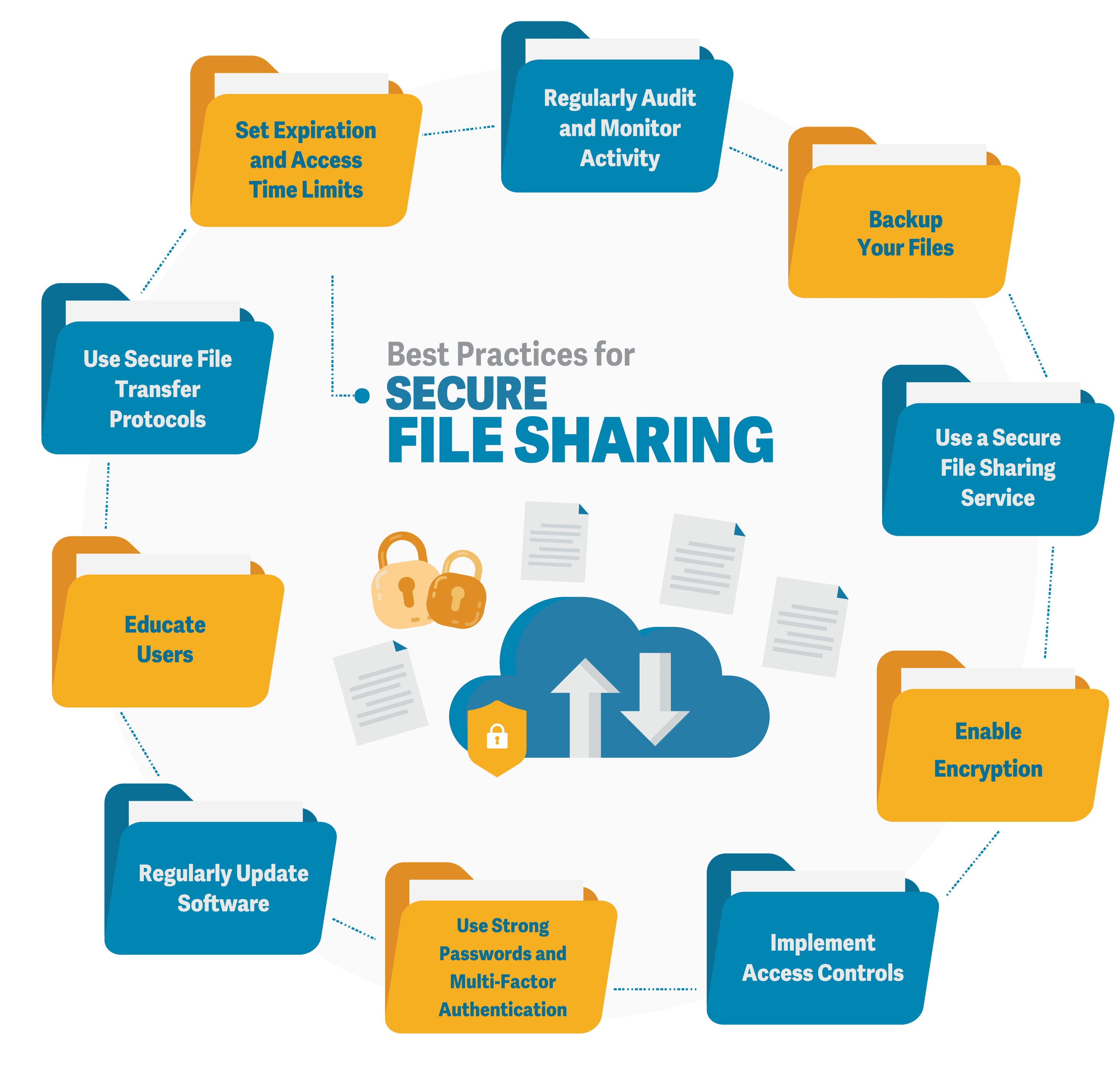
Guide to Secure File Storage and Transfers
File storage and transferring hold a very dear place in most people’s lives. However, the safety of files is really tough to maintain. In this guide, we are going to help you protect your files. We will explore ways to store and send files securely.
What is secure file storage?
Secure file storage protects your files. It prevents others from accessing your files or altering them in any way. Good storage grants protection to your files using locks. You alone can unlock such files.
Types of secure storage
Files can be stored securely in various ways, as listed below.
- Cloud
- Hard drives that are external
- Encrypted USB drives
Cloud storage saves files on the internet. External drives save files on a device you can hold. Encrypted drives use special codes to lock files.
Why is secure file storage important?
Secure storage keeps your information private. It stops thieves from stealing your data. It also helps you follow laws about data protection.
Risks of unsecured storage
Unsecured files can lead to huge troubles, including but not limited to the following:
- Identity theft
- Financial loss
- Privacy breaches
These risks give a reason why secure storage is important. You need to protect your personal and work files.
How Can I Make My File Storage Safer?
You can do so many things to make your storage safer, such as:
- Using strong passwords
- Enabling two-factor authentication
- Encrypting your files
- Keeping your software up to date frequently
Strong passwords are hard to guess. Two-factor authentication adds an extra step to log in. Encryption scrambles your files so others can’t read them. Updates fix security problems in your software.
Best practices for passwords
Good passwords are important. Here are some tips:
- Use long passwords
- Mix letters, numbers, and symbols
- Don’t use personal info in passwords
- Use different passwords for each account
These tips make your passwords stronger. Stronger passwords keep your files safer.
What is secure file transfer?
Secure file transfer is a way of sending files safely between individuals or devices. It prevents unauthorized access to files and prohibits modification of files while in transit. The better methods of transfer protect the files with encryption.
Common secure transfer methods
There are several ways to securely transfer files. They include:
- Secure FTP (SFTP)
- Virtual Private Networks (VPNs)
- Encrypted email attachments
- Secure file-sharing services
Each of the above methods provides additional security when you transfer your files. They ensure your data is secured during transfer.
How to Transfer Files Safely?
Transfer of files safely can be done by following the steps outlined below:
- Select a secure method of transfer
- Encrypt the file before you send it
- Give strong passwords for file access
- Authenticate the recipient
- Send the access details separately
These steps will keep your files safer while in transit. This way, they can only be accessed by those whom they are intended for.
How to email attachments safely
Attaching to an email poses a risk. Here’s how to make it safe:
- Encrypt important attachments
- Use a secure email service
- Avoid writing sensitive information in the body of an email
- Double-check the recipient’s email address
These will help protect your email attachments from being viewed by others. Here are some of the common file storage and transfer mistakes:
People make a lot of mistakes when it comes to file safety. Here are some common ones:
- Poor password creation
- Forgetting to encrypt the files
- Sending sensitive information over public Wi-Fi
- Not updating the security software
- Giving out access information with the files
These can expose your files to unnecessary risks. Keeping off them means you are keeping your data safe.
How to avoid these mistakes
You will avoid these errors by:
- Setting up a password manager
- Setting up automatic encryption
- Using VPN on public Wi-Fi
- Allowing auto-updates
- Sending access info separately from the files
These steps keep you off the common security mistakes. They make the storage and transfer of your files safer.
Ready to Secure Your Files?
It ensures that your data is protected from thieves and snoopers. Use strong passwords, encryption, and safe methods of transfer.
Need help with secure file storage? Feel free to reach out today and let us walk you through setting up safe systems for your files. Don’t wait until it’s too late; take the next step in protecting critical data.
—
This Article has been Republished with Permission from The Technology Press.
-
Seven Malicious Go Packages Found Deploying Malware on Linux and macOS Systems
Cybersecurity researchers are alerting of an ongoing malicious campaign targeting the Go ecosystem with typosquatted modules that are designed to deploy loader malware on Linux and Apple macOS systems.
“The threat actor has published at least seven packages impersonating widely used Go libraries, including one (github[.]com/shallowmulti/hypert) that appears to target financial-sector developers -

3 Portland federal buildings to be sold as U.S. eyes cost saving measures
 The U.S. General Services Administration claims the sale of “non-core” buildings could potentially save $430 million in annual operating costs.